
Review and approve a missing-path repair
Use local evidence to choose a destination, then check and approve the exact change.
Start with a path you want to investigate
As an administrator with the matched 0.8.0 pair, open RedirectNest → Smart repair. Enter a missing local path and choose Find possible destinations. This works with logging disabled and makes no destination requests.
Mark a path important only when that reflects your knowledge of the site. Priority uses that choice, fresh saved internal references and retained request counts. Counts may include bots and incomplete observations; they are not people, lost sales or a search score.
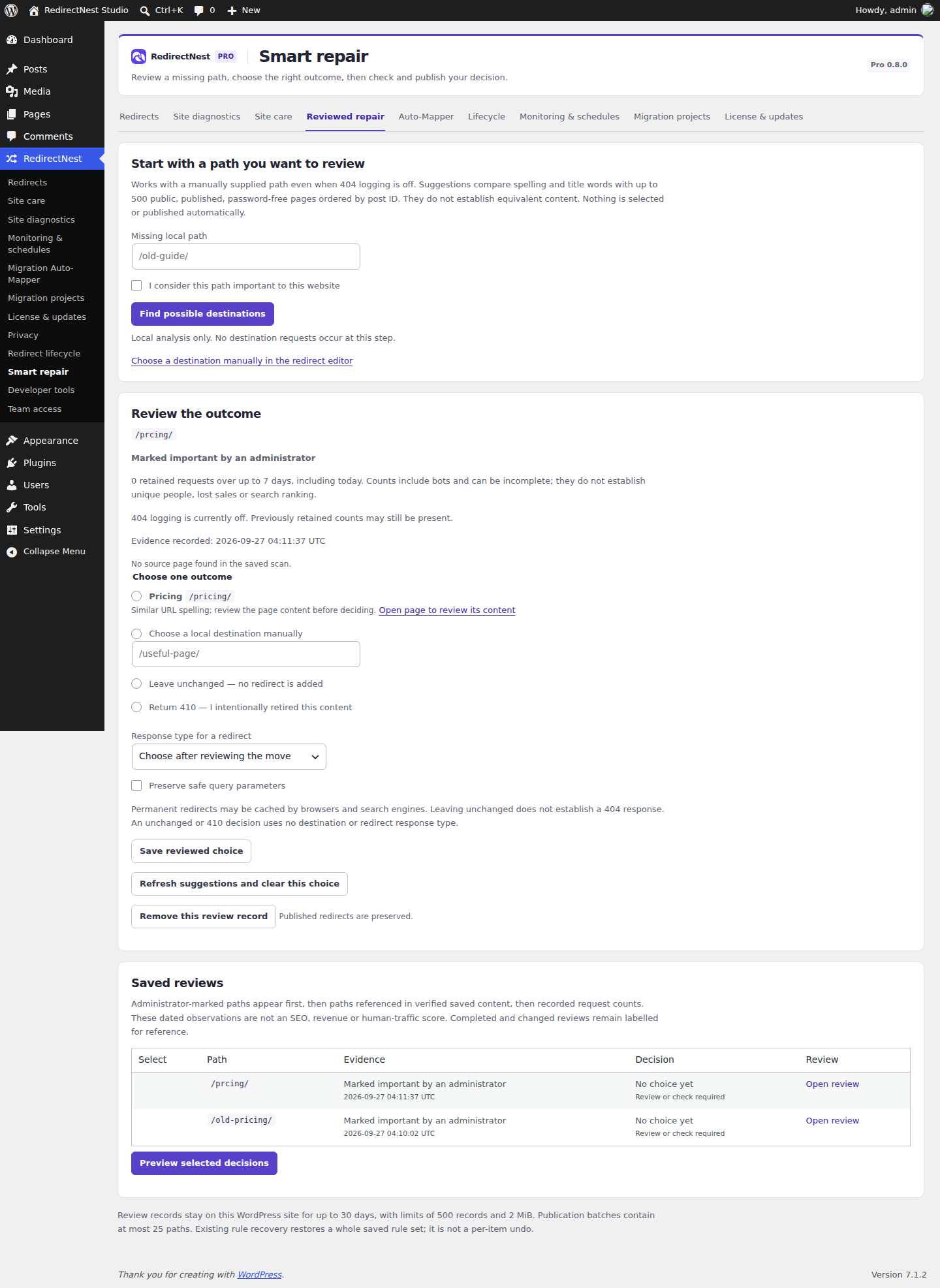
Review the reason and choose an outcome
The local index considers up to 500 public pages and offers at most three lexical candidates. Similar words do not establish equivalent content, and there are no confidence probabilities. Nothing is preselected. Open the candidate to assess its purpose, or choose a local destination manually.
Choose the redirect response and safe-query preference deliberately, then save the reviewed choice. You can instead leave the path unchanged or intentionally return 410. Leaving unchanged adds no redirect and does not itself establish a 404 response.
Authorize a destination check separately
For a chosen destination, review the request disclosure and authorize Check chosen destination. The server contacts the destination and safe redirect hops; operators can see its IP and requested URL. No visitor credentials or cookies are attached. A timeout or unavailable safe transport is unverified.
A passing HTTP result does not establish relevance. Changed content or rules and expired checks require fresh review. Unchanged and intentional 410 decisions do not request a destination.
Preview and approve the exact batch
- Select up to 25 ready decisions and choose Preview selected decisions.
- Inspect every proposed source, destination and response. Existing rules are preserved; an existing source is not silently replaced.
- Select the explicit batch approval and choose Publish reviewed decisions.
- Test the old paths and inspect the resulting pages. Use Review saved-content links for eligible internal links after publication.
The preview expires in 15 minutes. Changed rules or relevant content block publication; reload, recheck and rebuild the preview. The repair queue holds up to 500 reviews for 30 days. Whole-rule recovery replaces the entire current ruleset, so inspect later edits first.
These guides describe Free and Pro 0.8.0. Current downloads and availability.