
Keep the intention behind a redirect
Review possible chains, recent failed checks and dates you set without automatic deletion.
Read the reason for review
As an administrator, open RedirectNest → Redirect lifecycle. Findings include potential exact-rule chains, individually recent failed checks bound to the current rule generation, and review dates you set. Check timestamps and current rules before acting.
An old redirect or one with zero retained hits is not automatically unsafe or redundant. A potential chain needs investigation; external routing and content may change what a visitor sees. Lifecycle does not check new destinations, delete rules or rewrite them automatically.
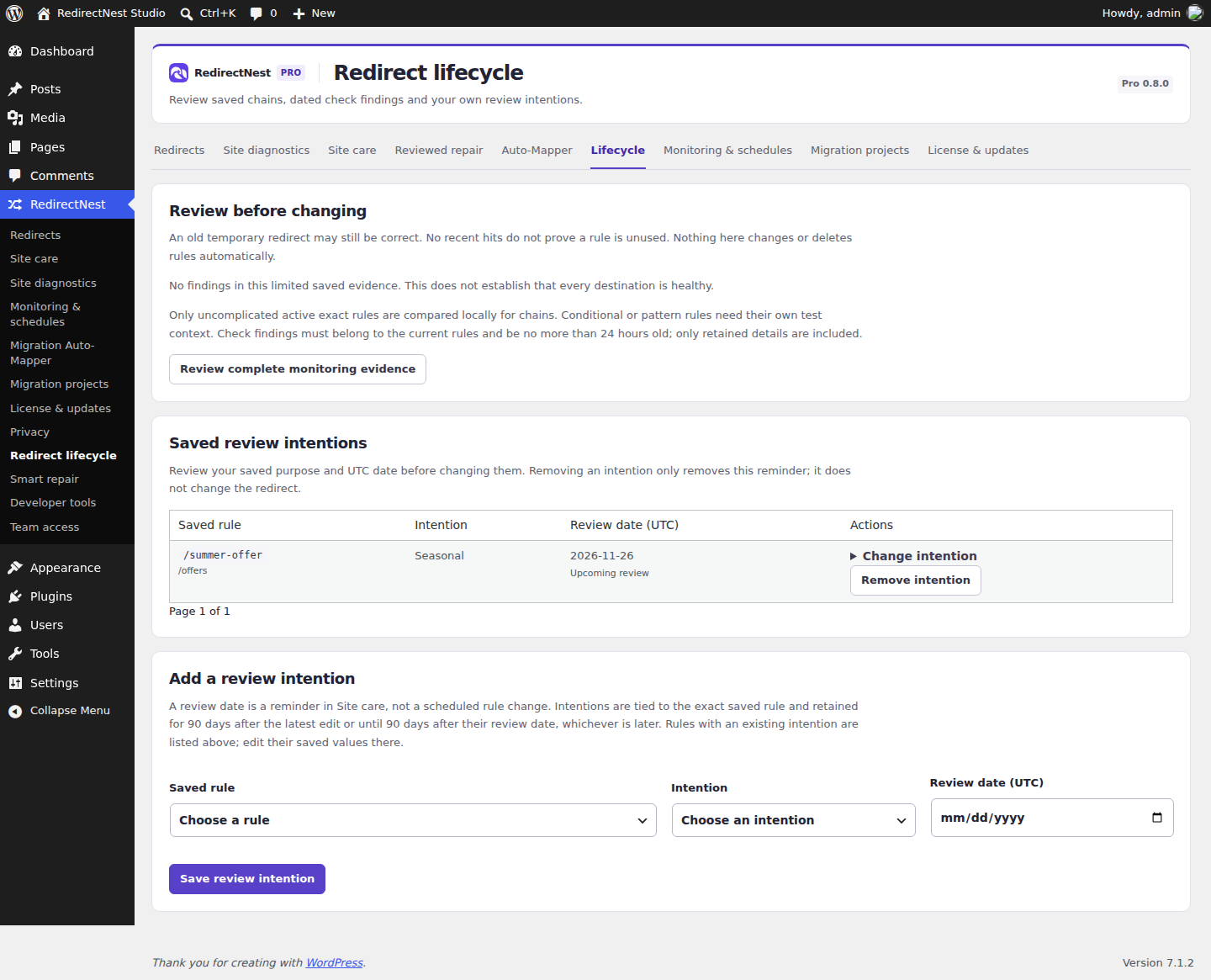
Save and maintain an intention
Choose an identified saved rule, choose its intention and set a review date in UTC. Saved intentions remain visible and can be edited or removed. If the rule changes, review the associated note instead of assuming it describes the new rule.
Intentions expire 90 days after their latest edit or requested review date. Removing a note does not remove the redirect. Auxiliary privacy erasure clears notes while preserving active rules.
Change only after review
Inspect the destination and actual response sequence. Use the normal redirect editor for a reviewed change, and test both expected and unaffected paths afterwards. Export before broad changes. A ruleset snapshot replaces the whole ruleset, including later changes; it is not a one-rule undo button.
These guides describe Free and Pro 0.8.0. Current downloads and availability.