
Run a reviewed migration
Separate the draft, checks, publication and recovery steps.
Create the mapping
Open RedirectNest → Migration projects. In Prepare a migration, enter a Project name, choose your CSV file and review the optional old/new domains and Existing sources setting. Choose Create draft project. If a project is already open, expand Prepare a migration below its current workspace to start another one.
Up to ten saved workspaces are supported. Switch between them under Saved migration workspaces below the current project. The current workspace shows its name, state and dated results. Expand Review changes to inspect the first 100 additions, changes and removals in each category; the printable Client report includes the complete diff.
Start from reviewed CSV mappings, or use Migration Auto-Mapper to review suggestions from two uploaded sitemaps before creating the draft.
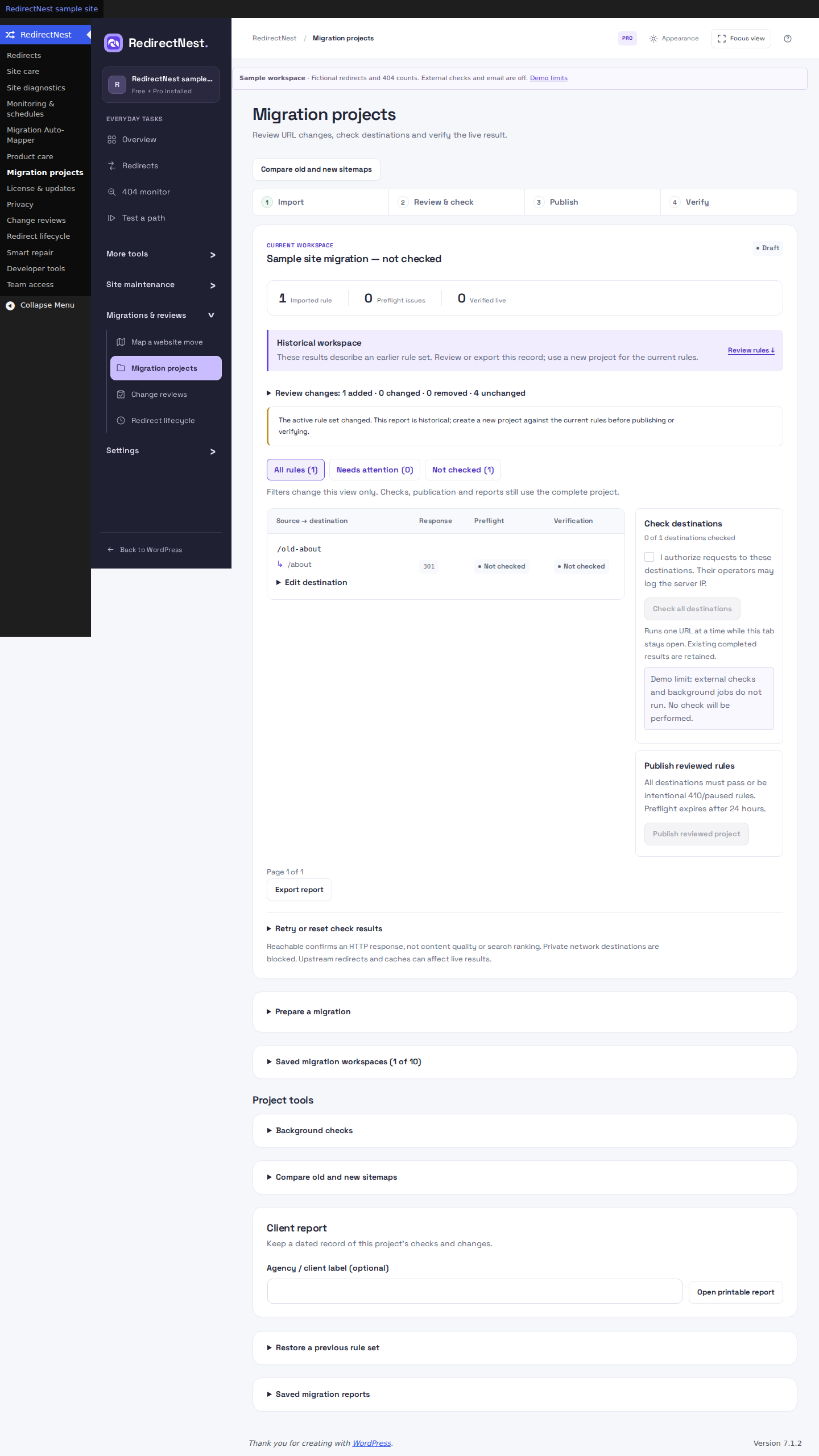 View full screenshot
Prepare sitemap comparisons
Under Project tools below the workspace, expand Compare old and new sitemaps. Upload individual XML URL sitemaps with a urlset root, encoded as UTF-8. If an XML encoding declaration is present, it must specify UTF-8. Each file must stay below 2 MB and contain at most 5,000 URLs. DTDs and entity declarations are rejected; convert UTF-16 or other encodings to UTF-8 before uploading.
Comparison requires PHP SimpleXML. Files are parsed locally, sitemap indexes are not accepted, and linked sitemaps are never fetched. Coverage shows whether URLs are represented; it does not prove equivalent content.
Editing a draft mapping clears its previous sitemap comparison. Upload both sitemaps again to compare the updated rules before relying on the coverage summary or including it in a new client report.
Run preflight
In the current workspace, review the request consent and choose Check all destinations. Inspect failures and use the expandable Retry or reset check results controls below the mapping table for unresolved rows. Under Project tools, expand Representative URLs for pattern checks and provide a representative URL for each wildcard or regex rule; a sample checks one match, so use the local tester for additional cases. Public-IP-pinned HTTP checks require a supported direct PHP cURL connection. Private-network targets are not supported. A timeout is unverified, not a pass.
Publish a reviewed set
Preflight results must be less than 24 hours old. Each row must have a passing result, be intentionally 410, or be paused. The live-rule version must still match the draft. If the active rules changed, create a new project against the current rules and rerun its checks; the old project remains historical. Choose Publish reviewed project only after review; its control stays unavailable until the required preflight checks pass. The previous set is retained for recovery.
Verify and hand off
After publication, review the request consent and choose Verify all live URLs. Check the live first response and final destination. Use Export report below the mapping table for dated observations. Under Project tools, the Client report section offers an optional Agency / client label and Open printable report. Keep an independent backup: a rule snapshot cannot reverse a CDN cache, WordPress content edit or server configuration change.
These guides describe Free 1.1.2 and Pro 1.1.2. Current downloads and availability.