
Choose exact or advanced matching
Choose an exact link, a whole folder or a query condition, then test an example.
Exact matching in Free
Free creates and edits exact redirect rules, with optional preservation of incoming query parameters. Exact matching is case-sensitive and treats trailing slashes as distinct by default. It includes a local tester and loop checks. Use a separate rule for each distinct move when a broad pattern is unnecessary.
In Free’s Add a redirect form, the link Need wildcard or regex rules? Explore Advanced matching · Pro add-on appears below the exact-path help when the Pro editor is unavailable. It opens the matching explanation inside the plugin. Your Free fields and Save redirect action remain available.
Redirect a whole folder with Pro
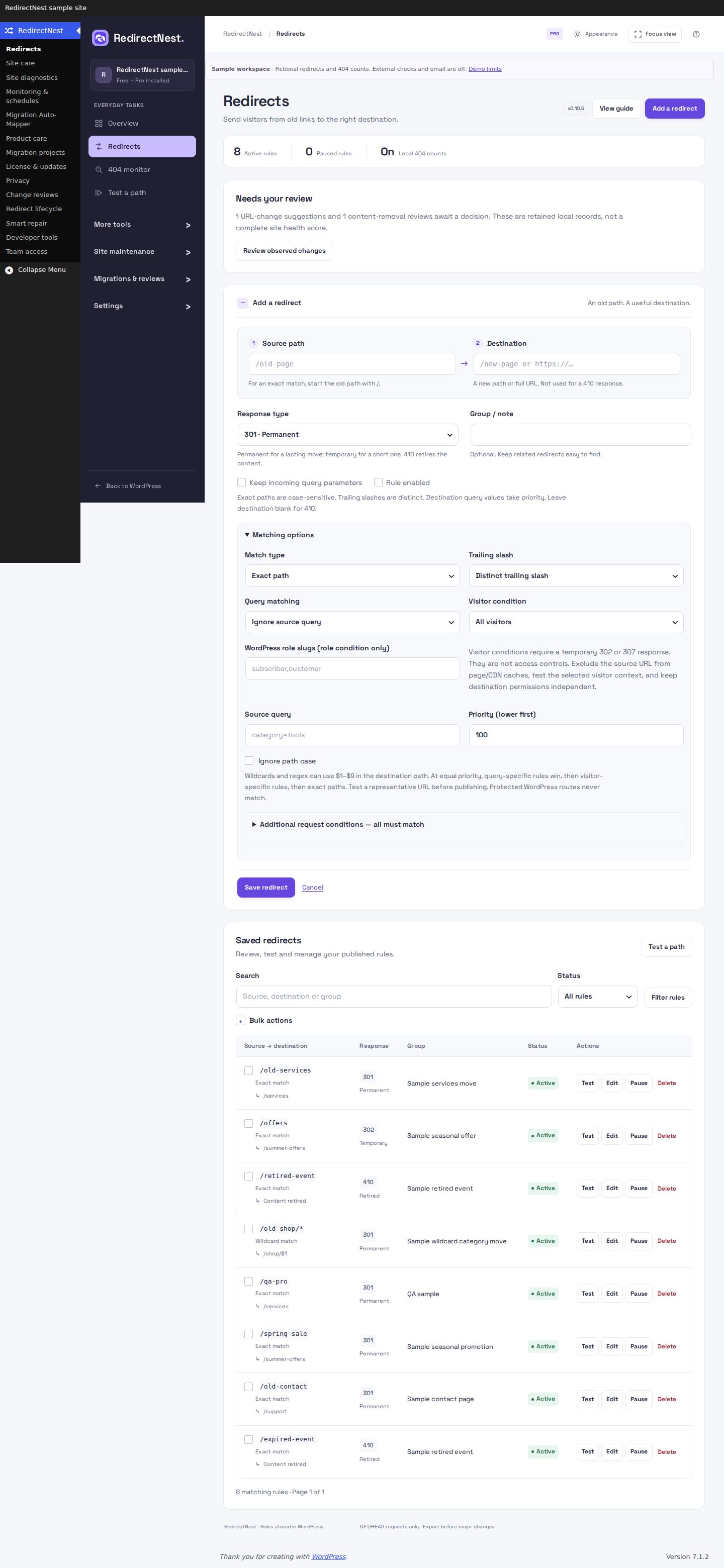
Use a wildcard when many old paths share the same move. In this example, /old-shop/shoes should become /shop/shoes, and nested product paths should keep their suffix too. Work on staging: Save redirect publishes the rule immediately.
- Open RedirectNest → Redirects → Add a redirect with activated Pro.
- Set Source path to
/old-shop/*, Destination to/shop/$1and Response type to 301 · Permanent. - Expand Matching options. Set Match type to Wildcard (* captures). Leave Ignore path case unchecked and the other matching options at their defaults.
- Keep Rule enabled selected and choose Save redirect. Open Test a path and try the cases below.
Expected results for this one rule
/old-shop/shoes- 301 →
/shop/shoes /old-shop/accessories/bags- 301 →
/shop/accessories/bags /blog/shoes- No match from this rule.
The * captures the rest of the path; $1 inserts it into the destination. Matching is case-sensitive in this example. Other saved rules can still handle a path this rule does not match. The local tester explains your saved rules; visit representative URLs too to check other server or cache behavior.
Try this folder example in the browser demo →
 View full screenshot
Match a campaign query with Pro
Query matching decides which request triggers a rule. Keeping query parameters decides what is carried to the destination; it is a separate setting.
- On staging, add a rule with Source path
/offers, Destination/spring-saleand Response type 302 · Temporary. Keep the query out of Source path. - Under Matching options, keep Match type as Exact path, choose Query matching → Contains query parameters, and enter
campaign=springin Source query. - For a clean destination in this example, clear Keep incoming query parameters. Save the enabled rule and test it.
Expected results for this one rule
/offers?campaign=spring- 302 →
/spring-sale /offers?campaign=spring&utm_source=email- Also matches: Contains allows extra parameters.
/offers?campaign=summer- No match from this rule.
Choose Exact query parameters instead when the whole parameter set must match: the extra utm_source in the second case would then prevent a match. Parameter order does not matter. Query conditions require Pro even when Match type is Exact path.
Check which query values survive
When preserving incoming queries, values already configured in the destination take priority. A destination /new?campaign=fixed keeps that value even if the request includes campaign=other or campaign[]=other. This protection also covers parameter names that PHP treats as equivalent, including dot and space variants.
Common credential and email parameter names are filtered before incoming queries are preserved, including nested names such as profile[email], credentials[accessToken] and encoded names such as access%20token. Filtering does not remove sensitive values you deliberately save in a destination. Keep secrets out of configured URLs and test the parameters your site needs.
Pattern limits and rule ordering
Pro supports up to 200 advanced rules within the overall 5,000-rule limit, with at most four wildcards in one source. A lower Priority (lower first) value is checked first. At equal priority, query-specific rules come first, then exact paths. Test both intended matches and similar URLs that should stay unchanged.
For regex, select Anchored regex and use an anchored source such as ^/old/(.*)$ with destination /new/$1. Lookarounds, backreferences inside the source pattern, recursion and inline options are not supported. Patterns match the whole path, including when they contain alternatives: ^/old|/other$ matches /old or /other, not /old-extra or /prefix/other.
A capture inserted into a destination query is encoded as a value. With source /old/* and destination /search?term=$1, /old/a&b becomes /search?term=a%26b. Captures inserted into destination paths keep their path behavior. Protected WordPress administration and API routes do not match.
Keep Pro active for advanced rules
Advanced redirects require Pro to remain installed and active. If Pro is removed or inactive, those rules stay saved but do not run. Free can still pause, delete, export and recover them; restoring compatible Pro resumes their matching.
This applies to advanced options on an exact path too, including source-query, visitor and request conditions. Rules with unavailable engines are skipped without dropping their conditions. Ordinary license expiry is different from plugin deactivation: previously activated installed Pro features keep working while the plugin stays active.
HISTORICAL CONTEXT
Earlier update notes
These notes explain changes introduced before 0.10.6. Use the current Free 1.1.2 and Pro 1.1.2 releases; the older version numbers are not extra installation steps.
Review existing patterns after the update
Version 0.5.5 preserves the distinction between regex syntax such as \d and \D when identifying case-insensitive rules. Some saved schedules or pattern samples can therefore need review. Follow the 0.5.5 update steps if a schedule reports a conflict or a saved sample is missing.
These guides describe Free 1.1.2 and Pro 1.1.2. Current downloads and availability.