
Create your first redirect
Move one exact path and check the result before adding more rules.
Choose the old path and new destination
Open RedirectNest → Redirects and choose Add a redirect to expand the form. It opens automatically when there are no saved rules. When you are editing an existing rule, Add a redirect starts a separate new rule. Use an exact source path such as /old-services and a destination such as /services. Use 301 for a permanent move or 302 for a temporary move; 307 and 308 are also supported. Use 410 for intentionally retired content and leave its destination empty.
Exact paths are case-sensitive by default, and /old-services and /old-services/ are distinct. The plugin redirects GET and HEAD requests that reach WordPress.
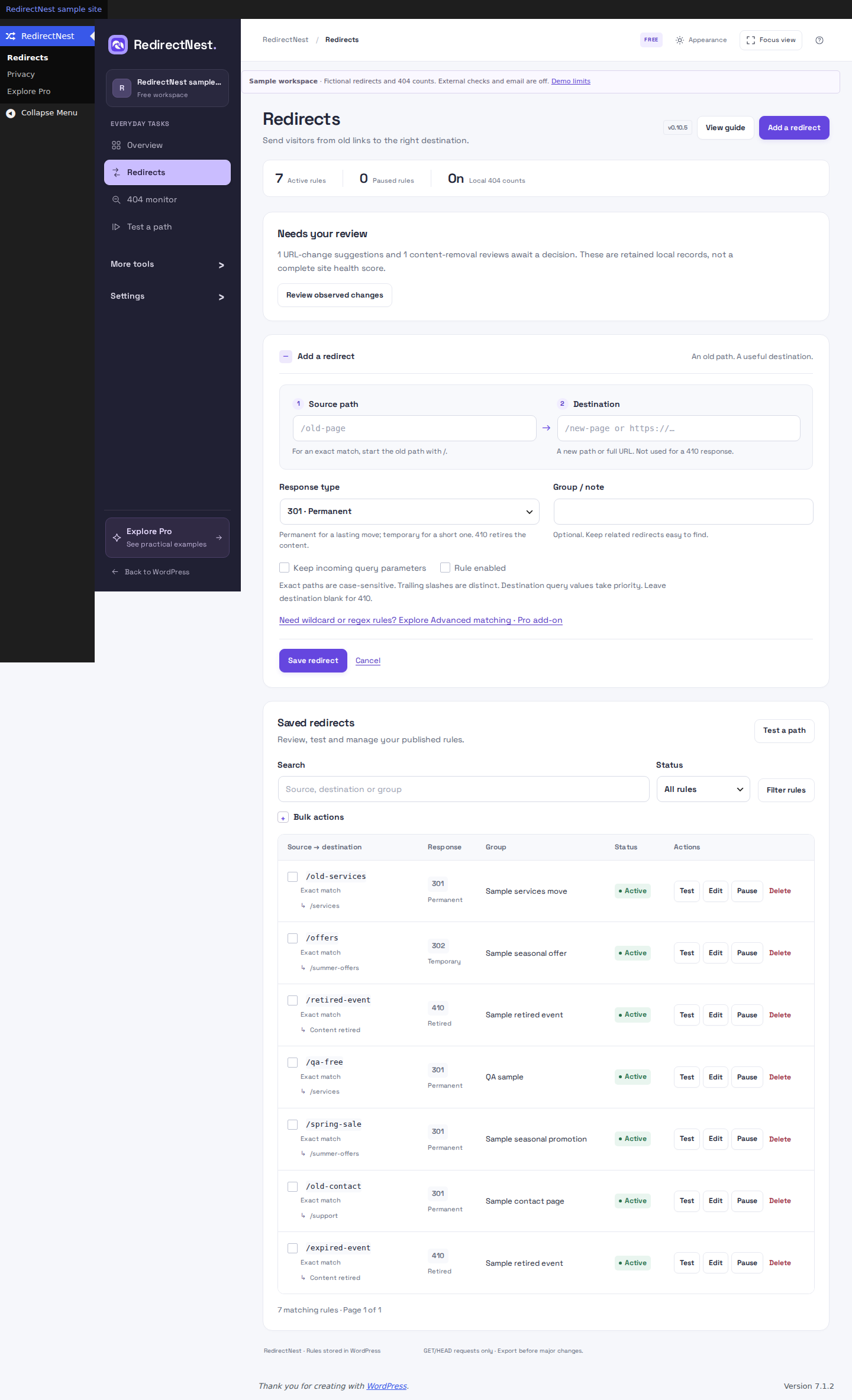 View full screenshot
When an exact path is not enough
For groups of URLs, follow Need wildcard or regex rules? Explore Advanced matching · Pro add-on below the exact-path help. The link opens a workflow explanation inside RedirectNest. It is separate from Save redirect and appears when the Pro editor is unavailable.
You can keep creating exact redirects in Free. Wildcard, regex, query and visitor-based rules require the separate, activated Pro add-on. Read the matching guide or see the new Explore Pro overview.
Save and test
Save the redirect, then choose the test link shown after saving. Each saved rule row also has a Test link. Exact rules prefill their source path; enter a representative sample for pattern rules.
Choose Test to evaluate the saved rules locally. Opening the link does not run a test or make an HTTP request. A local match is not an HTTP destination check: open representative URLs on staging and check caches, server rules and the resulting page separately.
Keep changes reversible
Pause, edit or delete individual rules. Export a CSV before a large change and retain a separate WordPress backup. Wildcards, bounded regex and advanced matching controls require activated Pro.
Enable, pause or delete selected rules
Free includes confirmed bulk enable, pause and delete. Select the intended rules under RedirectNest → Redirects, choose the action and review its confirmation. Pausing keeps settings; deleting removes the selected rules. Export a copy before a large cleanup.
Pro adds bulk group changes. If someone changes the rules while your form is open, reload and review the current selection before trying again.
These guides describe Free 1.1.2 and Pro 1.1.2. Current downloads and availability.